Getting started to manage Android, iOS, and macOS apps
Prerequisites
- Android apps only: Android EMM: Link your Google Play organization with KACE Cloud
- iOS and macOS apps only: Link KACE Cloud with Apple DEP
Related videos
KACE Cloud allows you to manage your organization's apps in the Library, and to deploy them to devices.
Android apps
To fully enable app management between KACE Cloud and Android work profiles, you can approve the KACE Cloud agent app, grant permission to publish private apps, and automatically set app permissions—all from the Android Settings page.

- Approving the KACE Cloud Agent app. After enrolling the organization, administrators can approve the KACE Cloud agent app to ensure automatic updates when new versions are released.
- Granting permission to publish private apps. After enrolling the organization, administrators can grant permission to KACE Cloud to publish private (such as internal or custom) apps to Google Play on behalf of the organization, if needed.
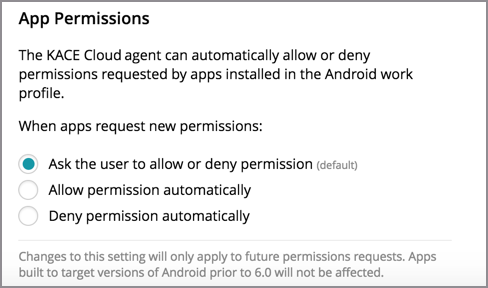
- Managing app permissions. KACE Cloud Agent can automatically allow or deny permissions requested by apps installed in the Android work profile. To set automatic App Permissions, go to Settings > Android Settings then choose to ask the user, allow, or deny new permissions. Your selection is saved automatically.
iOS and macOS apps
To set up KACE Cloud management of macOS apps in the Apple Volume Purchase Program (VPP), complete the instructions in Link KACE Cloud with Apple Business Manager.
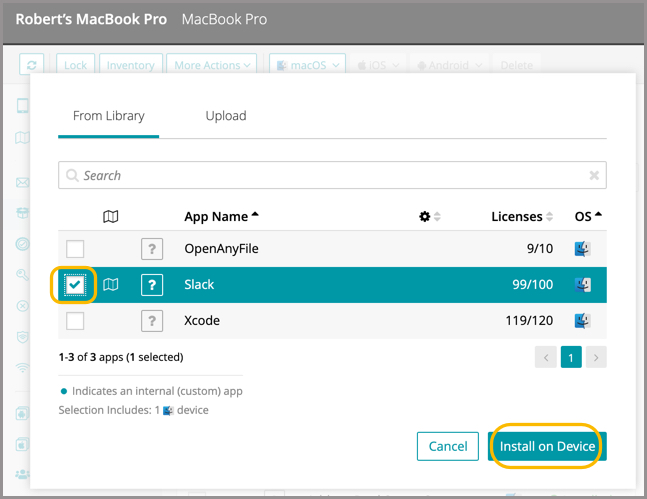
Installing a VPP app to a device is the same on macOS and iOS. For instructions, see Android, iOS, and macOS apps: Install apps on devices.